
You want to leave MyFitnessPal. Then you open your Recipe Box: years of soups, casseroles, cakes and family dinners. Perhaps there are 80. Perhaps 400. Rebuilding them looks like the price of leaving.
MyFitnessPal's official export leaves the Recipe Box behind. In Calk there is nothing to rebuild: describe the dish you ate today, save it with ♥, and the library fills with the food you actually eat.
That is the answer missing from most migration guides. They explain how to move history, paste ingredients or import a recipe from a website. None of those operations brings your saved MyFitnessPal recipes out.
What the MyFitnessPal export actually contains#
Every MyFitnessPal export contains the same three CSV files — meal nutrition details, progress history and exercise history — and only Premium subscribers can run one.1 Recipe definitions, their ingredient lists, their servings, saved Meals and My Foods are in none of the three.
The distinction matters. A row saying that dinner contained 640 kcal cannot reconstruct the recipe that produced it. It does not know whether the casserole used potato or pasta, chicken or beef, tomato sauce or cream, or how many servings came out of the pan.
MyFitnessPal’s Recipe Importer runs the other way: it takes a recipe URL or a pasted ingredient list and saves the result into your Recipe Box.2 Sharing is no better. The help center says plainly that you cannot share a recipe directly; the documented workaround copies a meal already logged in a friend’s shared diary.3
The Recipe Box does not come out. That is all of the bad news, and it is smaller than it looks.
Do not move the archive#
Four hundred saved recipes are not four hundred meals you need in a new app. They are years of kitchen history: old versions, one-off baking, three attempts at the same soup, dinners nobody at your table asks for any more.
Calk starts from the opposite end. Open the dish you are eating now, choose what it is made of, save it to favorites with ♥ and put it on your food tab. Next time it is two taps: open it, tap Eat. Change the sauce and everything else holds still while the numbers recalculate — you are keeping a meal template, not a frozen recipe card.
What you get is a decent estimate rather than a weighed one, and that is the trade on purpose: an estimate you keep making beats a gram-accurate archive you abandoned in month two.
The cloud of every casserole in the world#
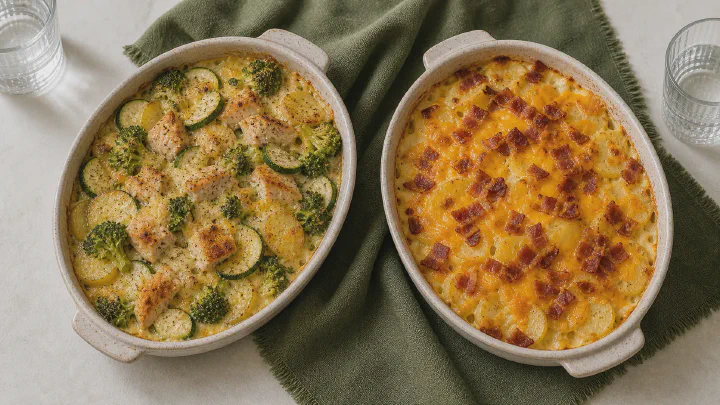
A casserole is a useful test because its name says almost nothing about its composition. It can begin with potato, pasta, rice, eggplant or cottage cheese. Protein, vegetables, cheese, cooking fat, sauce, topping and portion can all move independently.
In Calk those are visible choices:
- base
- protein
- vegetables
- cheese or fat
- sauce
- topping
- portion
The chart below shows 40,000 different casseroles Calk can already assemble. Nobody typed them in: every point came out of choosing those parts. Right means more calories per 100 g; up means more fat.
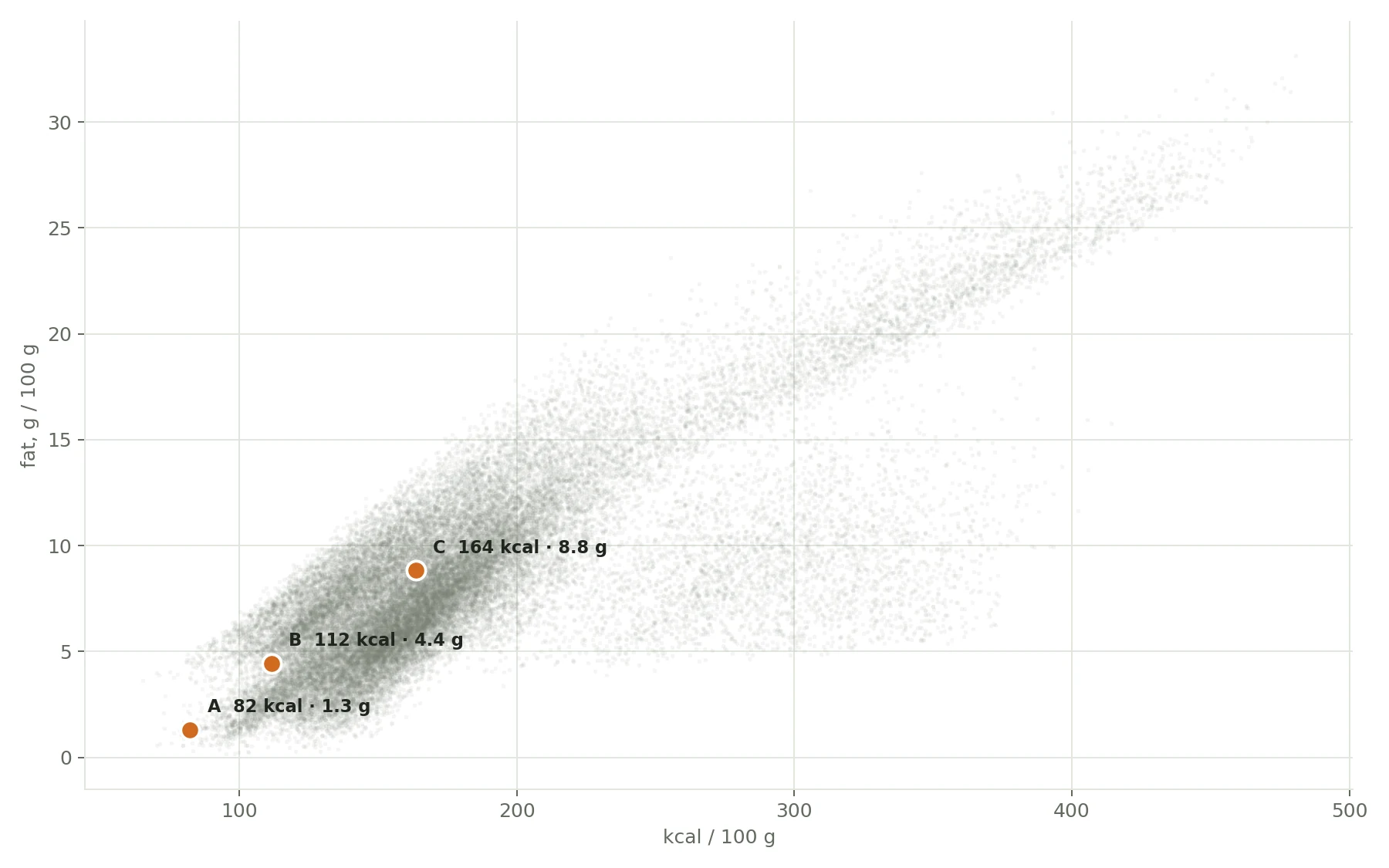
The three orange points show what those choices do:
Potato, a little chicken, plenty of zucchini, a little tomato sauceLean ingredients and more vegetables keep both axes low.
82 kcal · 1.3 g fatThe same casserole, now with cheddarOne visible addition moves the same dish to a new point.
112 kcal · 4.4 g fatMore potato and beef, cheddar, cream and baconThese choices move calories and fat together.
164 kcal · 8.8 g fatYou do not enter those 40,000 recipes, and you do not save A, B and C as three versions. You choose the casserole in front of you, and the number follows.
Next time, change only what changed: cheddar was absent, tomato became cream, the portion was larger. This is where Calk and MyFitnessPal part ways on the second entry.
What about baking, soups and salads?#
The casserole is not a special case. Calk has separate templates for soups, stews, curries, salads, savory and sweet bakes, homemade bread, cakes, cookies and the other food families that repeat in a home kitchen.
Each one exposes the choices that move the numbers for that kind of food: the base, the cooking method, the protein, the oil, the sauce, the additions and a portion that makes sense on that plate. A cake still needs a cake template and a soup still needs a soup template — the gain is that you start from the recognizable shape of the dish instead of an empty ingredient form.
What the logging is actually for#
A month of ordinary entries is enough for food observations and your first monthly Nutrition Report: which few dishes really define your month, and what one change inside them would move. Try the changes in those saved meals. Once each change is part of your routine, daily food logging ends. New weigh-ins update the weight trend. When the trend drifts, Calk asks you back; a week of food entries fills “Food variety this week” again. No streaks, no red days.
So open the first dish you eat after switching, choose what is in it, and let the library fill with food that is still part of your life. Next time, change one button instead of saving another version of the recipe.
Calk is available on iPhone, iPad, and Android.



Frequently asked questions#
Can I export saved recipes from MyFitnessPal?
Does the MyFitnessPal CSV contain my recipes?
Can another calorie tracker import MyFitnessPal recipes directly?
Do I need to recreate every recipe before switching?
Sources and review date#
MyFitnessPal’s export and recipe pages were re-read on September 5, 2026, along with the recipe-import documentation of Cronometer, which describes importing a recipe from a website rather than from MyFitnessPal.4 “No direct import” refers to documented product functionality, not to every private script or manual workaround.